

I keep getting the same question from teams building AI Agents on Azure.
“Where do we start?”
I see a lot of teams starting in the wrong place. They start with frameworks.
They debate Semantic Kernel, AutoGen, Agent Framework, or Foundry.
They pick tools before they define the actual shape of the solution.
That is usually where the trouble starts.
𝗕𝗲𝗳𝗼𝗿𝗲 𝘄𝗲 𝗴𝗲𝘁 𝗶𝗻𝘁𝗼 𝘁𝗵𝗲 𝗱𝗲𝗰𝗶𝘀𝗶𝗼𝗻 𝘁𝗿𝗲𝗲, 𝗶𝘁 𝗵𝗲𝗹𝗽𝘀 𝘁𝗼 𝘀𝘁𝗮𝗿𝘁 𝘄𝗶𝘁𝗵 𝘁𝗵𝗲 𝗯𝗿𝗼𝗮𝗱𝗲𝗿 𝗠𝗶𝗰𝗿𝗼𝘀𝗼𝗳𝘁 𝗮𝗴𝗲𝗻𝘁 𝗽𝗹𝗮𝘁𝗳𝗼𝗿𝗺 𝗹𝗮𝗻𝗱𝘀𝗰𝗮𝗽𝗲.
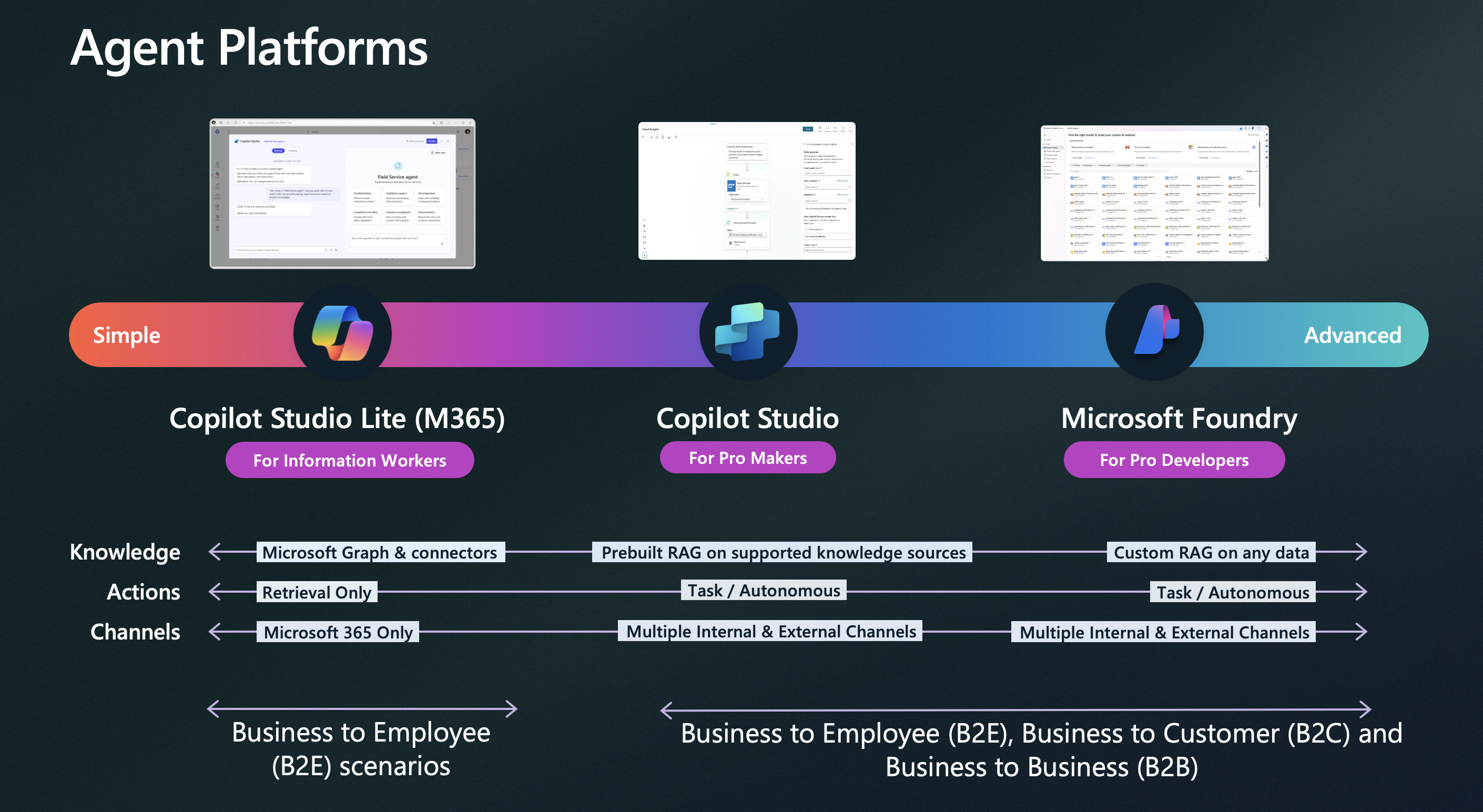
At a high level, Microsoft gives you three major paths across the spectrum.
Copilot Studio Lite for simpler Microsoft 365 scenarios.
Copilot Studio for pro makers who need more actions, channels, and orchestration.
Microsoft Foundry for pro developers who need deeper control, custom grounding, and advanced architectures.
That platform spread is exactly what makes the Microsoft ecosystem so powerful.
The real value of Microsoft’s agent ecosystem is not that it gives you a long list of products. It is that it gives you flexibility across multiple factors at the same time.
You can optimize for user experience.
You can optimize for speed to market.
You can optimize for cost.
You can optimize for security, governance, and reliability.
You can choose low-code or pro-code.
You can build for M365, Azure, web, mobile, or headless services.
You can connect to enterprise systems, structured data, unstructured documents, and analytics platforms.
That flexibility is what makes the ecosystem powerful. But only if you know how to read the decision tree.
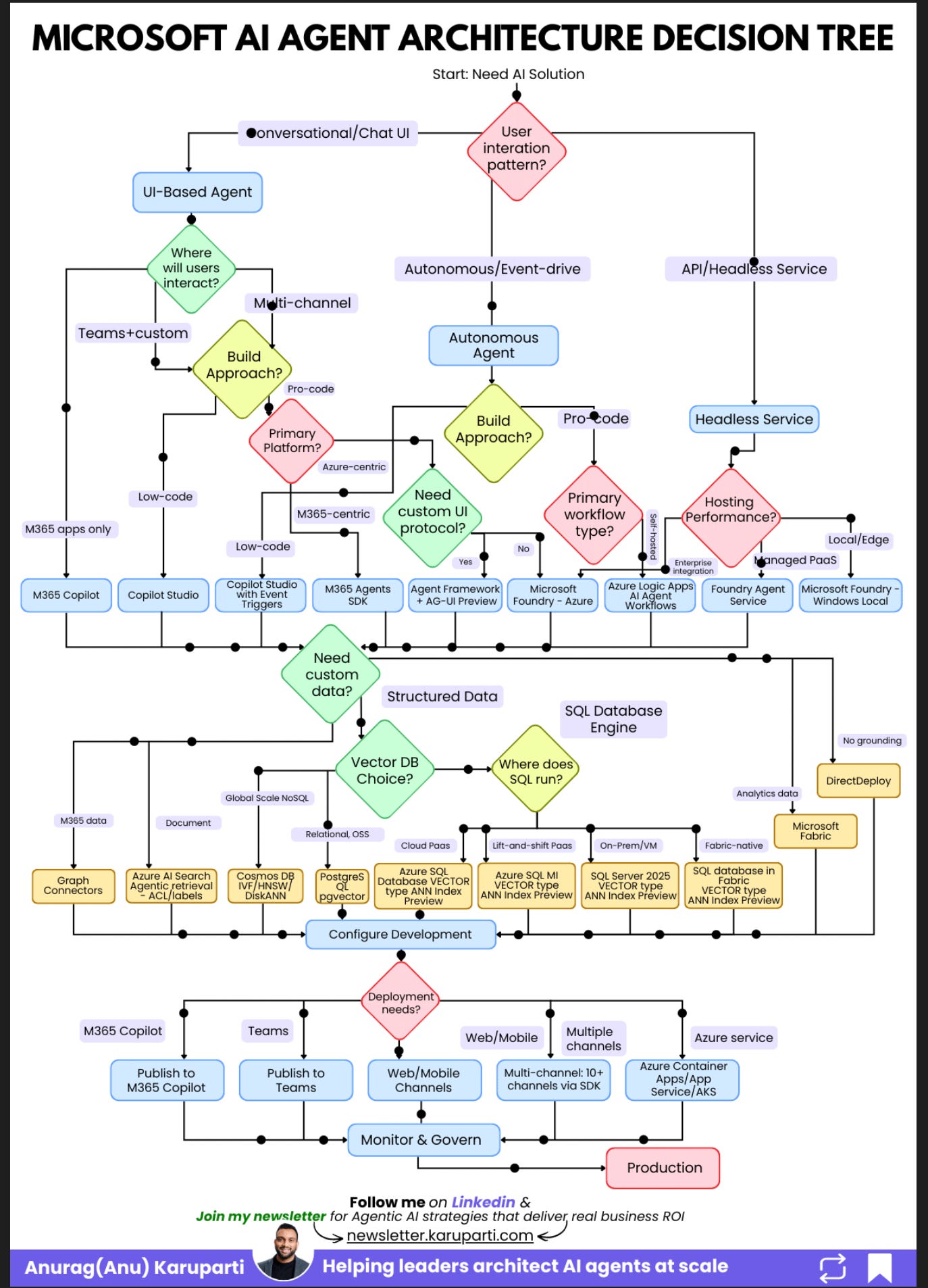
This is the whiteboard walk-through I keep using with teams. Once you see the diagram the right way, it stops looking like a product catalog and starts looking like what it actually is, an architecture filter.
My colleagues at Microsoft put together this decision tree that I have referenced here. It is worth reviewing if you are building AI agents on Azure. Check it out here.
𝗧𝗵𝗿𝗲𝗲 𝗧𝗵𝗶𝗻𝗴𝘀 𝘁𝗼 𝗞𝗲𝗲𝗽 𝗶𝗻 𝗠𝗶𝗻𝗱
First, start with the interaction pattern, not the tool.
The most important question is whether your agent needs a conversational UI, runs autonomously, or operates as a headless API service. Everything else flows from that.
Second, low-code is a strategic choice.
If your users already live in Teams and Microsoft 365, low-code can get you to production much faster. You do not need custom orchestration on day one just because it sounds more advanced.
Third, your data layer will make or break the system.
The quality of the agent depends on what it can access, how it retrieves it, and whether the architecture matches the shape of the data early enough.
𝗦𝘁𝗮𝗿𝘁 𝗛𝗲𝗿𝗲, 𝗧𝗵𝗲 𝗧𝗼𝗽 𝗼𝗳 𝘁𝗵𝗲 𝗗𝗶𝗮𝗴𝗿𝗮𝗺
At the very top of the diagram, the decision trees starts with one question:
What is the user interaction pattern?
That first fork creates three paths.
Conversational or Chat UI.
The user talks directly to the agent.Autonomous or Event-driven.
The agent runs in the background and reacts to triggers.API or Headless Service.
There is no user interface. Other systems call the agent as a backend service.
This is the step most teams skip.
They jump straight into tools when they should be deciding what kind of experience they are actually building.
𝗣𝗮𝘁𝗵 𝟭, 𝗨𝗜-𝗕𝗮𝘀𝗲𝗱 𝗔𝗴𝗲𝗻𝘁𝘀
Start with the left side of the diagram.
If users will chat with the agent, the next question is simple:
Where will they interact with it?
If the experience lives only inside Microsoft 365, start with M365 Copilot.
This is the cleanest option when your users already work inside the Microsoft ecosystem and you want a strong user-in-the-loop experience without building a custom application layer.
If the experience needs to live in Teams or across multiple channels, move to the next question:
Do you want low-code speed or pro-code control?
If speed matters most, use Copilot Studio.
This is the best fit when you want to move quickly, support business workflows, and avoid turning every requirement into a software engineering project.
For many internal copilots, this is the fastest path from idea to production.
If you need more control, go pro-code.
That is where the diagram asks another important question:
Is the experience M365-centric or Azure-centric?
If it is M365-centric, use M365 Agents SDK.
If it is Azure-centric, ask one more question:
Do you need a custom UI protocol?
If yes, this is where Agent Framework plus AG-UI comes in.
AG-UI matters because it gives agents a standard way to connect to modern frontends. It supports streaming, shared state, and richer interactive experiences. That is becoming more important because agent experiences are no longer just chat windows. They are increasingly embedded into responsive web and app interfaces, and teams need a cleaner protocol for that layer.
If you do not need that custom UI layer, Foundry is the cleaner Azure-first path.
So the UI branch is much simpler than it looks in the diagram.
It really comes down to four decisions:
Is this a chat experience?
Where does the user interact?
Do you want low-code or pro-code?
Are you M365-first, Teams first or Azure-first?
That is it.
𝗣𝗮𝘁𝗵 𝟮, 𝗔𝘂𝘁𝗼𝗻𝗼𝗺𝗼𝘂𝘀 𝗔𝗴𝗲𝗻𝘁𝘀
Now move to the middle branch of the diagram.
This path is for agents that run in the background.
They react to triggers. They process information. They take action with limited or no direct user interaction.
Here, the question is less about chat and more about orchestration, integration, and control.
If you want a lower-code path, Copilot Studio with Event Triggers is a strong starting point.
If you need a custom UI protocol and richer app experiences, Agent Framework plus AG-UI gives you that extra layer of flexibility.
If you are Azure-centric and need deeper enterprise controls, Foundry is the stronger fit.
If your biggest requirement is integration with enterprise systems like SAP, ServiceNow, or Salesforce, Logic Apps AI Agent Workflows is often the better route because the connector story matters more than the model story in those scenarios.
Azure Logic Apps is Microsoft’s enterprise integration layer. It gives agents access to real business systems through 1,400+ connectors, and now those workflows can also be exposed as MCP tools for standardized agent access.
If the solution is more M365-centric, M365 Agents SDK is the right fit on this branch as well.
The key idea here is simple.
Autonomous agents are not just chatbots without chat.
They are workflow systems.
That means the architecture choice should follow the workflow, the triggers, and the integration surface.
𝗣𝗮𝘁𝗵 𝟯, 𝗛𝗲𝗮𝗱𝗹𝗲𝘀𝘀 𝗦𝗲𝗿𝘃𝗶𝗰𝗲𝘀
Now look at the right side of the diagram.
This branch is for headless services.
There is no UI. No chat window. No copilots embedded in an app.
The agent exposes a service that other systems call.
Once you are on this path, the main decision is usually hosting.
Do you want a managed platform service?
Do you need local or edge deployment?
Do you need full self-hosting control?
That is why the right side of the diagram is less about user experience and more about runtime shape.
This is the right path when the agent is acting as infrastructure, not as an end-user interface.
𝗗𝗼 𝗡𝗼𝘁 𝗦𝗸𝗶𝗽 𝘁𝗵𝗲 𝗗𝗮𝘁𝗮 𝗟𝗮𝘆𝗲𝗿
This is where many teams underinvest.
If you look at the middle of the diagram, the next major question is whether the agent needs custom data.
That is not a side decision. That is a core architecture decision.
If the agent needs Microsoft 365 data, you start looking at options like Graph connectors and the broader M365 data layer (Sharepoint).
If the agent needs unstructured document grounding at massive production scale, Azure AI Search becomes important quickly.
If the agent needs vector search or structured retrieval, you need to decide early whether the right fit is Cosmos DB, PostgreSQL with pgvector, Azure SQL, SQL Server, or Fabric SQL.
If the agent needs analytics context, Fabric enters the picture.
This is why data architecture should not be treated as an implementation detail.
The quality of your agent responses will depend far more on the retrieval layer than most teams expect.
𝗪𝗵𝗲𝗿𝗲 𝘁𝗵𝗲 𝗔𝗴𝗲𝗻𝘁 𝗔𝗰𝘁𝘂𝗮𝗹𝗹𝘆 𝗥𝘂𝗻𝘀
Once you move through the interaction model, build approach, and data layer, the final question in the diagram is deployment.
Where does the agent actually need to show up?
This part matters because deployment is not just about infrastructure. It is about who needs access to the agent and through which channel.
If the agent is meant for Microsoft 365 users, publish it to the Microsoft 365 Copilot channel.
In low-code scenarios, Copilot Studio is often the clearest path to build and publish into that experience.
If the agent is meant to live inside Teams, publish it to Teams.
If the experience is web or mobile first, deploy it through standard web and mobile channels.
If the same agent needs to reach multiple surfaces, use the multi-channel SDK route.
If you need full infrastructure control or want to run the agent as an Azure service, deploy it through Azure Container Apps, App Service, or AKS.
That is the bottom section of the diagram in plain English.
It is really asking one simple question:
Where do your users, apps, or systems need to reach the agent?
That answer determines the final delivery model.
And once that is in place, there is one last box in the diagram that teams should not treat as optional:
Monitor and govern.
If the agent is heading toward production, observability, governance, and control need to be part of the design from the start.
𝗪𝗵𝘆 𝘁𝗵𝗲 𝗠𝗶𝗰𝗿𝗼𝘀𝗼𝗳𝘁 𝗘𝗰𝗼𝘀𝘆𝘀𝘁𝗲𝗺 𝗠𝗮𝘁𝘁𝗲𝗿𝘀
This is the part I think many teams underestimate.
The Microsoft ecosystem gives you room to optimize across more than one dimension at once.
You are not forced into a single build style.
You are not forced into one deployment channel.
You are not forced into one data layer.
You are not forced into one level of abstraction.
You can move fast with low-code.
You can go deep with pro-code.
You can stay close to M365.
You can go Azure-native.
You can plug into enterprise workflows.
You can ground agents in documents, databases, or analytics systems.
You can ship through Teams, Copilot, web, mobile, or APIs.
That flexibility is exactly why the decision tree matters.
It helps you choose the architecture that matches your constraints instead of defaulting to the option that sounds the most sophisticated.
𝗧𝗵𝗲 𝗦𝗵𝗼𝗿𝘁𝗰𝘂𝘁
If I had to compress the entire diagram into a few lines, I would say this:
Start with the interaction pattern.
If it is a chat experience, begin with where the user interacts.
If it is low-code and M365-heavy, start with M365 Copilot or Copilot Studio.
If it is pro-code and more custom, move toward M365 Agents SDK, Agent Framework plus AG-UI, or Foundry depending on whether you are M365-first, UI-custom, or Azure-first.
If it is autonomous, optimize for workflow and integrations.
If it is headless, optimize for hosting and runtime.
Then make the data and deployment decisions.
One more thing: watch the retirement dates
Before you commit to a framework, check that it is not sunsetting:
Bot Framework retired December 31, 2025. Successor: M365 Agents SDK
azure-ai-inference SDK retires May 30, 2026. Successor: the openai SDK
Assistants API sunsets August 26, 2026. Successor: Foundry Agent Service / Responses API
If your chosen technology has a retirement date within your planning horizon, pick the successor now. Migrating mid-project is always more expensive than starting on the right platform.
𝗙𝗶𝗻𝗮𝗹 𝗧𝗵𝗼𝘂𝗴𝗵𝘁
Most teams do not need the most advanced option.
They need the right option.
Start with the interaction pattern.
Follow the tree in the order it was designed.
You will land on an architecture that actually fits your requirements, instead of one you have to fight against.
References
https://microsoft.github.io/Microsoft-AI-Decision-Framework/docs/visual-framework.html
https://learn.microsoft.com/en-us/agent-framework/integrations/ag-ui/?pivots=programming-language-csharp