

Building an AI agent takes 1-3 days. Operating 50 agents safely in production? That’s a different problem entirely.
Here’s what actually happens when agents multiply across an enterprise:
A marketing team spins up a customer service agent for Black Friday. Three days of work with LangChain. Works great in testing. Ships to production.
Two weeks later: 50,000 emails with incorrect pricing. Customer data accessed from departments it should never have touched. No audit trail. No policy enforcement. No one in IT even knew the agent existed.
This isn’t a hypothetical. This is happening right now across enterprises.
The pattern repeats:
DevOps builds an agent to automate ticket routing
Finance creates one to process expense reports
Sales deploys one to qualify leads
Legal sets up an agent for contract review
Each team moves fast. Each uses different frameworks. Each implements security differently (or not at all).
Six months later, IT discovers 47 agents running across the organization. Some on developer laptops. Some in cloud services with unclear governance. A few abandoned but still executing.
Every single one is a potential compliance violation, security risk, or operational disaster waiting to happen.
The disconnect is fundamental: Building agents is now trivially easy. Operating them at enterprise scale is still brutally hard.
Why Agent Management Breaks at Scale
The problem isn’t technological capability. The problem is operational readiness.
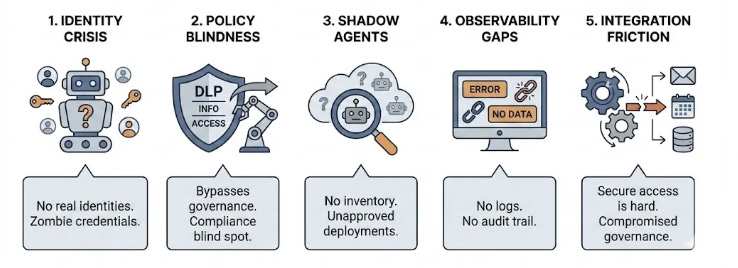
Five hard problems emerge when you move from “we built an agent” to “we’re running 50 agents in production”:
1. Identity Crisis
Agents don’t have real identities. They run with human credentials, overly broad service accounts, or API keys passed around Slack. When something goes wrong, you can’t tell which agent did what. When an employee leaves, their agents keep running with zombie credentials.
You need: Tenant-scoped identities for every agent. Least-privilege access. Sponsor assignment. Lifecycle workflows that actually work.
2. Policy Blindness
Your data loss prevention rules? Your information protection labels? Your conditional access policies? None of them apply to agents.
Agents bypass the governance that applies to every human in the organization. They’re compliance blind spots operating in production.
You need: Policy evaluation at every tool call. Adaptive enforcement that respects organizational rules. Real-time defense against risky behavior.
3. Shadow Agents
IT has no idea what agents exist. Development teams ship agents without central approval. No inventory. No tracking. No lifecycle management.
The new shadow IT problem is agents deployed at the speed of AI development.
You need: A registry. Complete visibility into what’s running, who created it, what it can access, whether it’s still in use.
4. Observability Gaps
When an agent misbehaves, you can’t reconstruct what happened. No comprehensive logs. No audit trail. No way to measure business impact or ROI.
You need: Unified telemetry. Integration with security tools teams already use. Performance metrics that actually map to business outcomes.
5. Integration Friction
Agents need to work inside business workflows to be useful. They need to send emails, schedule meetings, retrieve documents, access CRM data. All while respecting security boundaries.
Building these integrations safely is hard. Most teams either skip security or never ship.
You need: Secure, policy-aware access to business systems. Integration that works without compromising governance.
What Agent 365 Actually Is
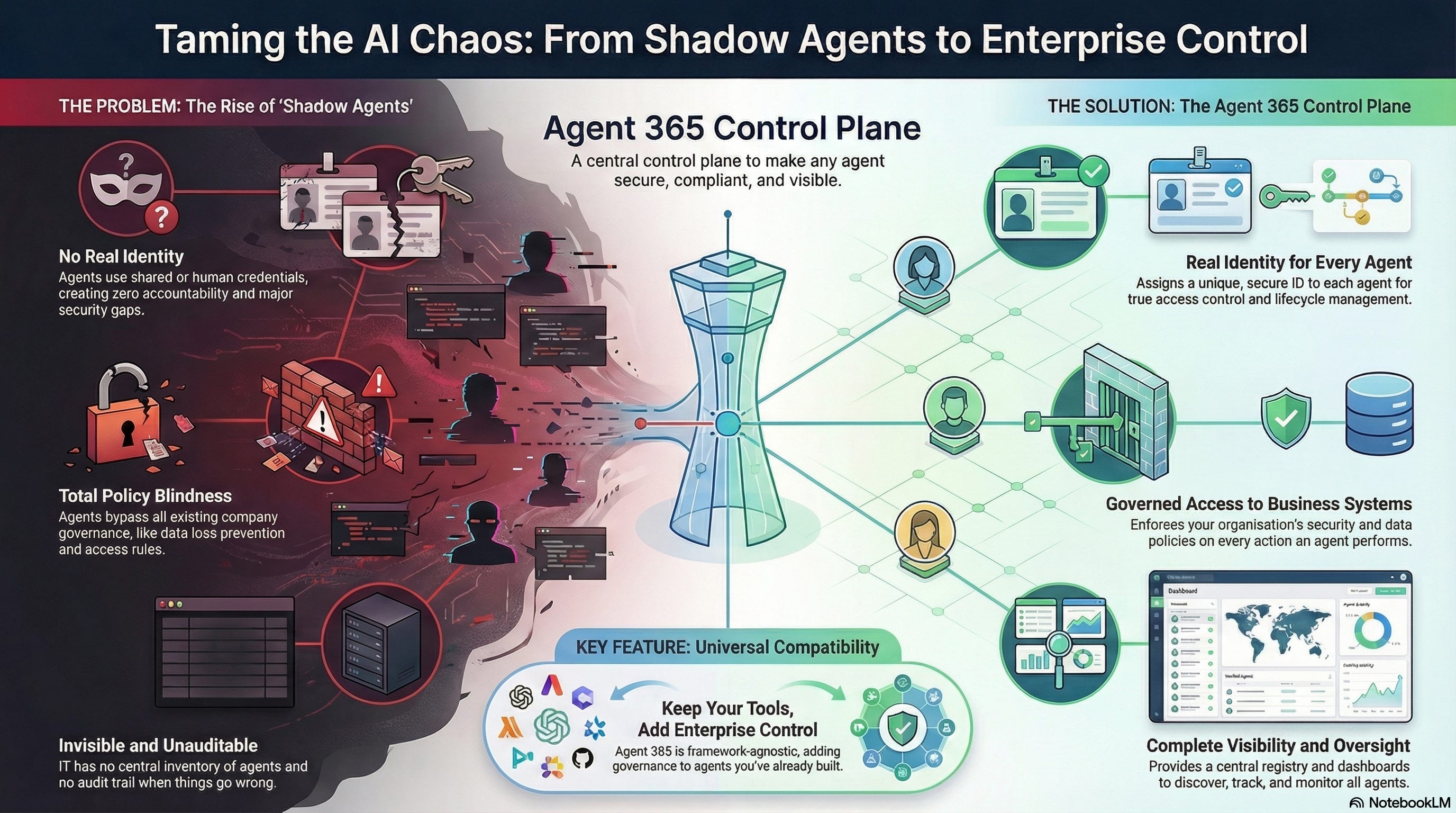
Agent 365 is Microsoft’s answer announced at Ignite 2025 to the agent management problem. Think of it as the control plane for agents. It is the missing layer between “we built an agent” and “this agent is safely operating in production.”
It’s not about making agents smarter. It’s about making them production-ready.
The core insight: Agents need the same enterprise controls that apply to human users, identity, governance, observability, security but built for autonomous systems that execute code and take action.
The Five Pillars

1. Registry: Complete Visibility A unified inventory of every agent in your organization. Self-registered agents, shadow agents you didn’t know existed, agents with formal IDs. All in one place.
Every agent becomes discoverable, trackable, and manageable. No more surprises.
2. Access Control: Real Identity Every agent gets an Entra Agent ID and a first-class identity with tenant-scoped boundaries. IT assigns sponsors, enforces lifecycle workflows, applies conditional access policies based on risk.
Agents only access what they need, when they need it. When credentials need rotation or an agent needs retirement, the controls actually work.
3. Visualization: Monitor What Matters Real-time dashboards showing agent behavior, performance, business impact. See connections between agents, people, and data.
Measure ROI. Assess risk. Provide role-based oversight for IT, security, and business stakeholders. Actually know what your agents are doing.
4. Interoperability: Work Where People Work Agents connect to Work IQ for business context. They integrate with Microsoft 365 apps - send emails, schedule meetings, retrieve SharePoint documents, participate in Teams conversations.
All while respecting data governance and security policies. Agents operate inside familiar workflows, not as isolated experiments.
5. Security: Defend in Production Integration with Microsoft Sentinel and Defender. Real-time threat detection. Investigation capabilities. Remediation workflows.
DLP enforcement. Insider risk signals. Adaptive controls that protect against oversharing, leaks, and compromised agents. Security that actually understands agent behavior.
Why This Matters: Freedom of Choice
Here’s the unlock: Agent 365 is agnostic to how you build your agents.
Already have agents built with LangChain? Custom frameworks? Keep them. Agent 365 wraps around your existing architecture to add enterprise capabilities without forcing you to rebuild.
Your dev team keeps their tools, their workflows, their innovation speed. Agent 365 just makes their output production-ready.
Three paths to enablement:
Path 1: Copilot Studio
Fastest time-to-value. Low-code agent creation. Connect data and actions, test, publish into Microsoft 365. Agent 365 enablement adds identity, policy enforcement, security automatically. No extra glue code.
Use when: You need rapid deployment with minimal custom logic.
Path 2: Microsoft Agent Framework + Azure AI Foundry
For advanced multi-agent coordination, complex workflows, deep customization. Build with the Agent Framework, host in Foundry, enable with Agent 365 for identity, governed tool calls, lifecycle hooks.
Use when: You need sophisticated orchestration patterns and full control over agent logic.
Path 3: Any Stack with Agent 365 SDK
The universal path. SDK available for .NET, Python, Node.js. Add enterprise capabilities to agents built with any framework.
Install the SDK. Define your agent’s identity. Add observability. Integrate governed tools. Publish to Microsoft 365. Enable governance.
Use when: You have existing agents or specific framework requirements.
The outcome is identical: Enterprise-ready agents with security, governance, compliance, and Microsoft 365 integration—regardless of your development stack.
The Technical Details That Matter
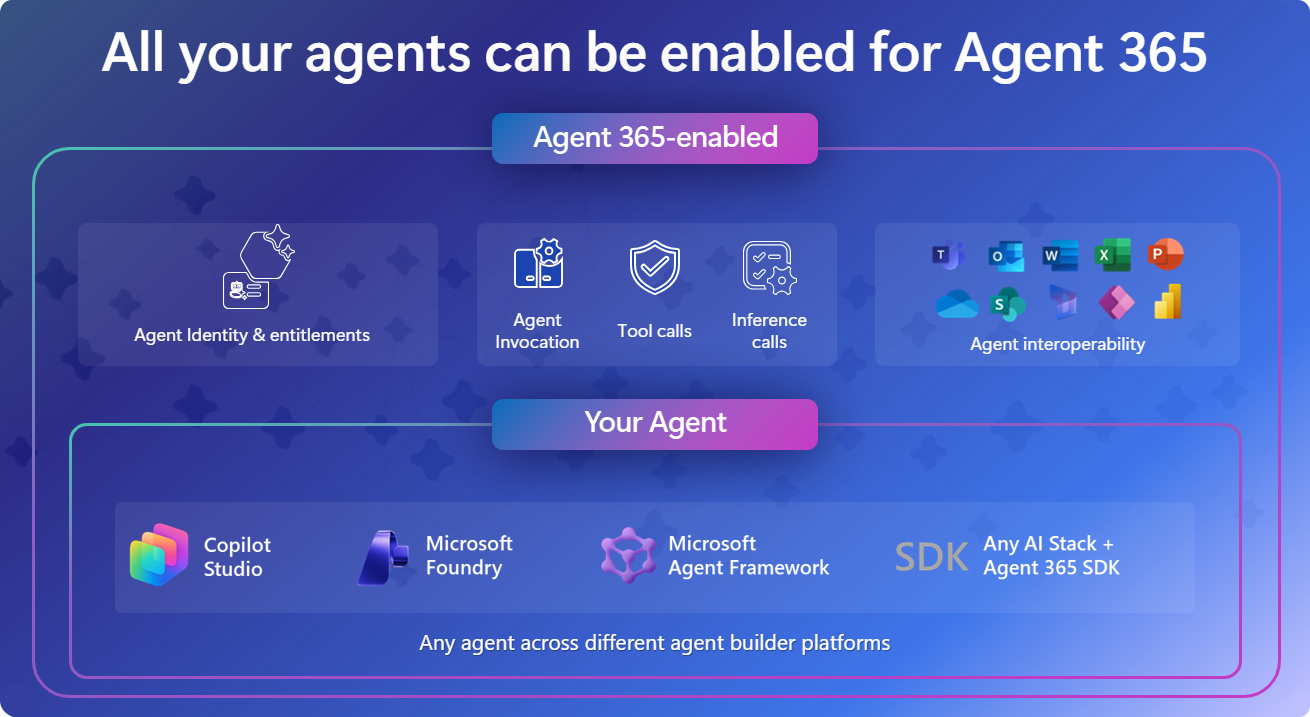
Agent Identity and Entitlements
Every agent gets an Entra Agent ID. When an agent sends an email, it authenticates as itself - not as the developer who created it. Not as some shared service account.
IT sees exactly which agent took which action. Can revoke access if needed. Can enforce conditional access policies based on risk signals.
This isn’t cosmetic. It’s foundational to operating agents safely at scale.
Governed Tool Calls
When an agent calls a tool accessing a SharePoint document, sending a Teams message. Agent 365 evaluates that call against organizational policy.
Document has a sensitivity label requiring extra permissions? Access blocked or elevated based on policy.
DLP rules apply automatically. No separate enforcement layer to maintain.
Agent 365 MCP Servers
Secure Model Context Protocol servers for Outlook Mail, Calendar, Teams, SharePoint, OneDrive.
These aren’t just API endpoints. They’re policy-aware integrations that enforce governance while enabling agents to automate real work.
Agents can schedule meetings, retrieve documents, send messages, all under the same security controls that apply to human users.
Unified Tracing and Audit
Every agent interaction generates structured logs that flow into Microsoft Sentinel.
Security teams investigate incidents. Compliance teams audit behavior. Business teams measure impact.
All from the same telemetry infrastructure already in use for human users. No new monitoring stack to learn.
Lifecycle Management
Agents follow governed workflows from creation to retirement.
Sponsors assigned. Approvals tracked. Abandoned agents flagged automatically.
IT never loses track of what’s running in production. When an agent needs retirement, the process actually works.
How to Enable Agent 365
For low-code: Build in Copilot Studio, Agent 365 enablement is automatic.
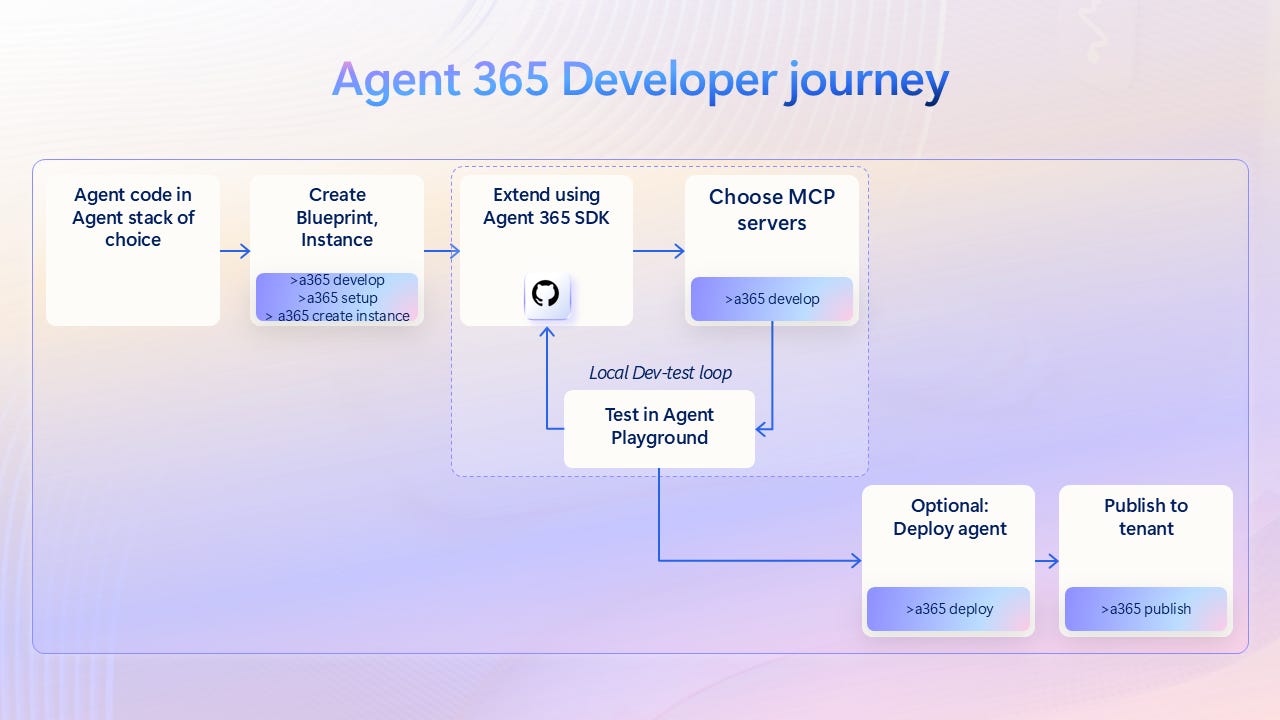
The basic flow (code-first path):
Install the SDK for .NET, Python, or Node.js
Define agent identity and permissions
Add observability using the unified tracing schema
Integrate governed tools required for your workflows
Publish to Microsoft 365 so users can discover and deploy
Enable governance so IT can establish guardrails
For advanced scenarios: Use Microsoft Agent Framework with Foundry, then enable with Agent 365.
Who’s Building With It
Telstra is using Agent 365 to scale AI across their organization with enterprise governance built in.
EY is building multi-agent workflows for finance and operations, using the SDK to add identity, lifecycle management, and compliance controls.
Ecosystem partners including Adobe, ServiceNow, SAP, Databricks, Nvidia, and others are integrating with Agent 365 to bring their tools into governed enterprise workflows.
The Real Problem Agent 365 Solves
Back to that Black Friday disaster. With Agent 365:
The customer service agent would have appeared in IT’s registry the moment it was created
It would have had its own identity with least-privilege access
Policy evaluation would have blocked unauthorized data access
DLP rules would have prevented the mass email without any customer data compromised
Comprehensive audit logs would have reconstructed exactly what happened
Security teams would have received alerts about unusual behavior
The agent didn’t need to be smarter. It needed to be enterprise-ready.
Resources:
Quick Start Guides for Microsoft Agent Framework, LangChain, Claude