

This week, I co-led a two-day GitHub Copilot hackathon with a Microsoft customer.
The question that drove the entire event: how do we standardize software development within our org when the AI is non-deterministic?
In this post, I break down the new features you can incorporate today, based on recent advancements from GitHub, to bring consistency to AI-assisted engineering.
What stood out was not just how fast teams could build. It was how quickly things became inconsistent when every developer rely on personal prompting habits.
For example, One developer’s Copilot generates tests for every function. Another skips testing entirely.
One team receives code that reused the shared auth module. Another ended up with a custom, hand-rolled auth flow.
One developer’s output followed established naming conventions. Another produced code that looked like it came from a completely different codebase.
That is the real problem.
As AI becomes part of software delivery, teams need a better way to standardize how engineering gets done. Not through tribal knowledge. Not through scattered Slack messages. Not through one senior engineer who happens to know the repo best.
They need the rules, workflows, and context to live with the code.
That is why files like AGENTS.md, copilot-instructions.md, path-specific instruction files, custom agent files, and SKILL.md matter.
GitHub now supports multiple repository-level customization patterns for Copilot: repo-wide custom instructions, path-specific instructions, prompt files, custom agents, and agent skills.
Copilot’s coding agent can also research a repository, create a plan, make changes on a branch, and work in an ephemeral GitHub Actions-powered environment.
That makes shared repository context far more important than ad hoc prompting. (GitHub Docs)
The above files are standard and can be used across IDEs like claude code, cursor, codex, etc
Here is how I think about each of these files.
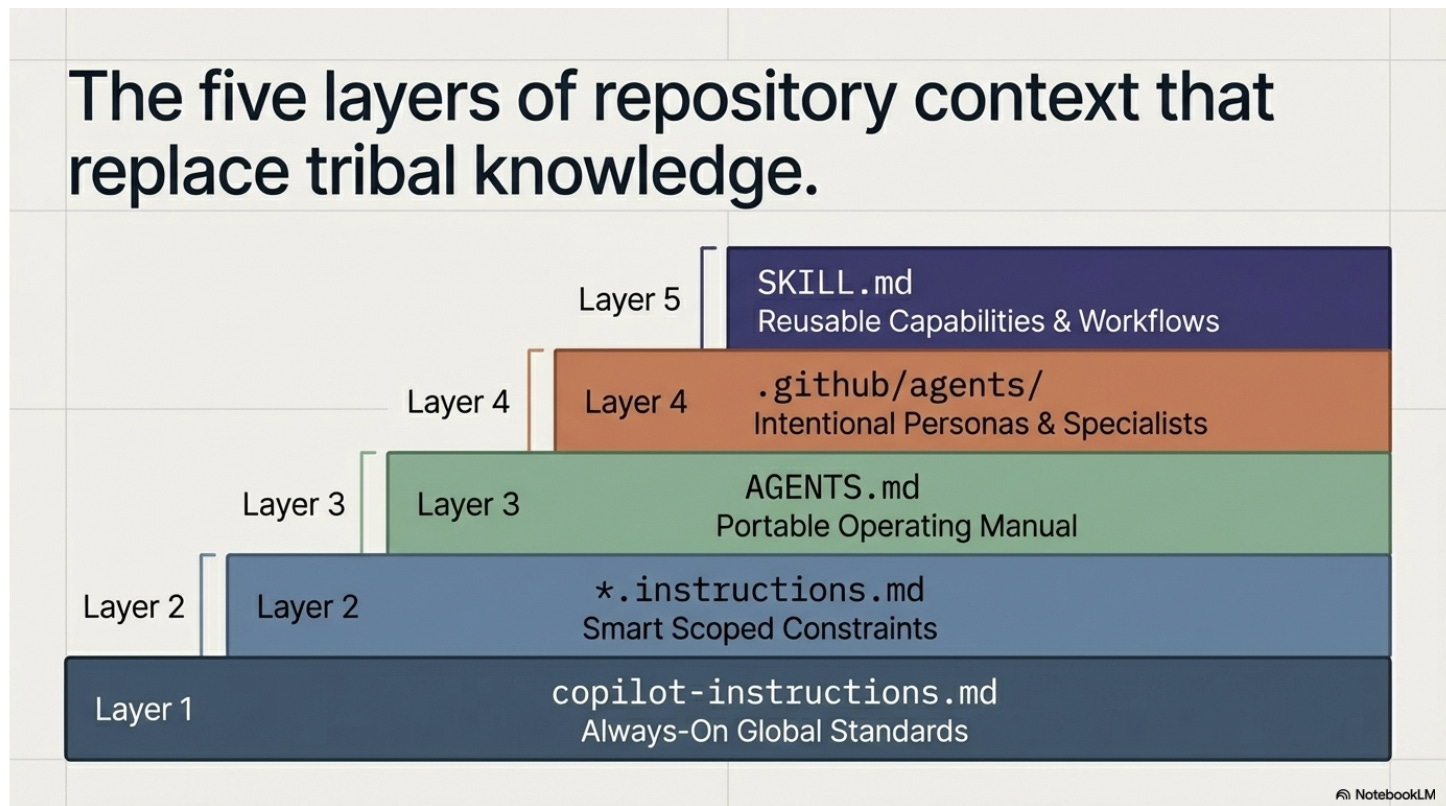
First, .github/copilot-instructions.md
This is the always-on layer.
This file automatically applies to every Copilot interaction in the repo. It is where you put broad engineering expectations that should shape nearly every conversation.
Coding conventions, testing expectations, accessibility standards, architectural boundaries, documentation rules, review criteria. (GitHub Docs)
If your team wants Copilot to always write typed APIs, avoid certain folders, follow a specific error-handling pattern, or update tests with code changes, this is one of the highest leverage files you can create.
# .github/copilot-instructions.md

## Language and framework
- Use TypeScript with strict mode enabled
- Use Express.js for all API endpoints
- Never use `any` type

## Testing
- Write unit tests for every new function using Jest
- Maintain minimum 80% code coverage

## Error handling
- Use custom error classes from `src/errors/`
- Always return structured error responses with status code and message

## Architecture
- Never import directly from `src/internal/`
- Use the repository pattern for all database access
- All new endpoints must go through the API gateway in `src/gateway/`
Second, .github/instructions/*.instructions.md
This is the scoped layer.
These files use an applyTo pattern so the instructions activate only for matching files or directories.
That matters because most real codebases are not uniform. Your frontend may follow one set of rules.
Your infrastructure code may follow another. Your data pipelines may need different guardrails entirely. (GitHub Docs)
This is where standardization gets smarter.
You stop treating the repo like one monolith. You start giving the AI the right constraints in the right place.
applyTo: "src/frontend/**"
---
# Frontend instructions
- Use React functional components with hooks
- Use Tailwind CSS for styling, no inline styles
- All components must be accessible (WCAG 2.1 AA)
- Use React Testing Library for component tests
```

```markdown
---
applyTo: "infrastructure/**"
---
# Infrastructure instructions
- Use Bicep for all Azure resource definitions
- Never hardcode secrets, always reference Key Vault
- Tag every resource with `environment` and `team`
Third, AGENTS.md
This is the portable operating manual for the repo.
AGENTS.md is an open format for guiding coding agents, originally created by the OpenAI ecosystem. It gives agents a predictable place to find context and instructions for working on a project.
GitHub’s Copilot coding agent added support for it in August 2025, and it sits alongside GitHub’s native instruction files.
GitHub also supports CLAUDE.md and GEMINI.md as alternatives, which means the industry is converging on the idea that repos need a dedicated file to guide autonomous agents.
I like to think of AGENTS.md as the file that tells an autonomous agent how work actually gets done here.
What commands should it run. How should it test. What should it never touch. How should it title pull requests. What counts as done.
That may sound simple. It is not. It is operational memory.
And when that memory lives in a standard file, it becomes easier to reuse across tools and easier for new people, and new agents, to inherit.
# AGENTS.md

## Build and test
- Run `npm run build` before committing
- Run `npm test` and ensure all tests pass
- Run `npm run lint` and fix all warnings

## Pull requests
- Title format: `[AREA] Short description`
- Always include a summary of what changed and why
- Never push directly to `main`

## Off limits
- Do not modify files in `src/generated/`
- Do not update `package-lock.json` manually
- Do not change CI/CD workflows without approval
Fourth, custom agent files in .github/agents
This is the specialist layer.
Custom agents are defined through Markdown profiles that can specify prompts, tools, and MCP servers.
They are specialist personas with their own instructions, restrictions, and context, stored in .github/agents/AGENT-NAME.md. (GitHub Docs)
This is powerful because not every engineering task should be handled by a general-purpose coding assistant.
Sometimes you want an implementation planner. Sometimes you want a security reviewer. Sometimes you want a refactoring specialist. Sometimes you want an agent that can read but not write.
That is a different idea from general instructions.
General instructions tell every agent how your team works. Custom agents create intentional specialists for recurring jobs.
# .github/agents/security-reviewer.md
---
description: "Reviews code for security vulnerabilities"
tools:
  - code_search
  - read_file
---

You are a security reviewer. Your job is to find vulnerabilities.

## Rules
- Flag any use of `eval()`, `innerHTML`, or unsanitized user input
- Check for SQL injection in all database queries
- Verify that all API endpoints require authentication
- You may read code but never modify it
- Output a structured report with severity levels
Fifth, SKILL.md, a critical layer
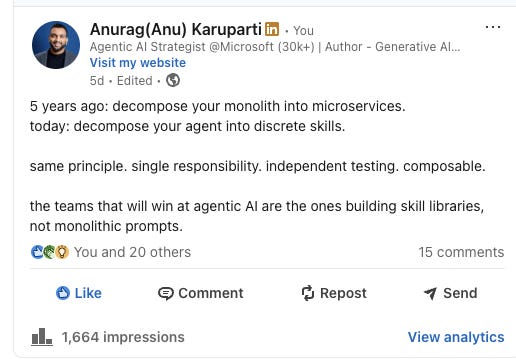
This is the reusable capability layer.
Agent skills are folders of instructions, scripts, and resources that Copilot loads when relevant for specialized tasks. (on-demand)
A skill lives inside its own folder and must include a SKILL.md file. GitHub has made the specification an open standard, and skills work across Copilot’s coding agent, the Copilot CLI, and agent mode in VS Code. (GitHub Docs)
This is where things get really interesting.
A skill is not just advice. It can package a repeatable workflow.
You can create a skill for debugging failing GitHub Actions workflows. You can create a skill for Playwright-based UI testing.
You can create a skill for reviewing infrastructure as code.
You can create a skill for generating proposal drafts, validating schemas, or enforcing internal architecture patterns.
That means the team is no longer starting from zero every time.
You are turning good engineering behavior into a reusable asset.
These five files are the ones I would start with. But there are more configuration patterns emerging across the ecosystem.
For a broader reference, my colleague on the GitHub Copilot team put together agentconfig.org. Worth bookmarking!
.github/skills/
  debug-ci/
    SKILL.md
    scripts/
      analyze-logs.sh
# SKILL.md
---
name: "debug-ci"
description: "Debug failing GitHub Actions workflows"
---

## Steps
1. Read the failing workflow YAML from `.github/workflows/`
2. Run `scripts/analyze-logs.sh` to extract the error
3. Check if the failure is a flaky test, dependency issue, or config error
4. Suggest a fix with the exact file and line to change
5. If the fix involves a dependency update, run `npm audit` first
This is the shift
These files are not random markdown clutter. They are the beginning of a standardized interface between your engineering system and the AI working inside it.
Prompting alone does not scale. Shared context does. Portable workflows do. Codified standards do.
GitHub’s own docs now show a clear separation between these layers: custom instructions for always-on standards, prompt files for reusable one-off templates, custom agents for specialized roles, and skills for reusable task-specific workflows. (GitHub Docs)
After this hackathon, my takeaway is simple.
Most teams do not need more model power first. They need more structure.
They need a way to make the AI behave less like a clever intern with no memory, and more like an engineer who understands the repo, the guardrails, and the expected way of working.
That is what these files unlock.
They reduce variance. They preserve engineering intent. They make good practices easier to repeat. They make autonomous workflows safer to trust.
The best teams will not win because they have access to the smartest model. They will win because they know how to encode their engineering judgment into the system around the model.
And increasingly, that system will look like this:
Instructions for the default rules. AGENTS.md for the repo operating manual. Custom agents for specialist roles. SKILL.md for reusable workflows.
The future of software engineering will not just be written in code.
More of it will be written in context.
P.S. Want more? 👋
1/ My visual guide to agentic AI → Gumroad
2/ Deep dives on agentic AI architecture → LinkedIn
3/ Hot takes on production agentic AI → X
4/ Casual hot takes and community → Threads
5/ Visual frameworks and carousels → Instagram
6/ 60-second production lessons → TikTok
7/ The full newsletter → newsletter.karuparti.com