

Last week I shipped Paws & Patterns to the iOS App Store. (Website)
It is a health tracker for pet parents.
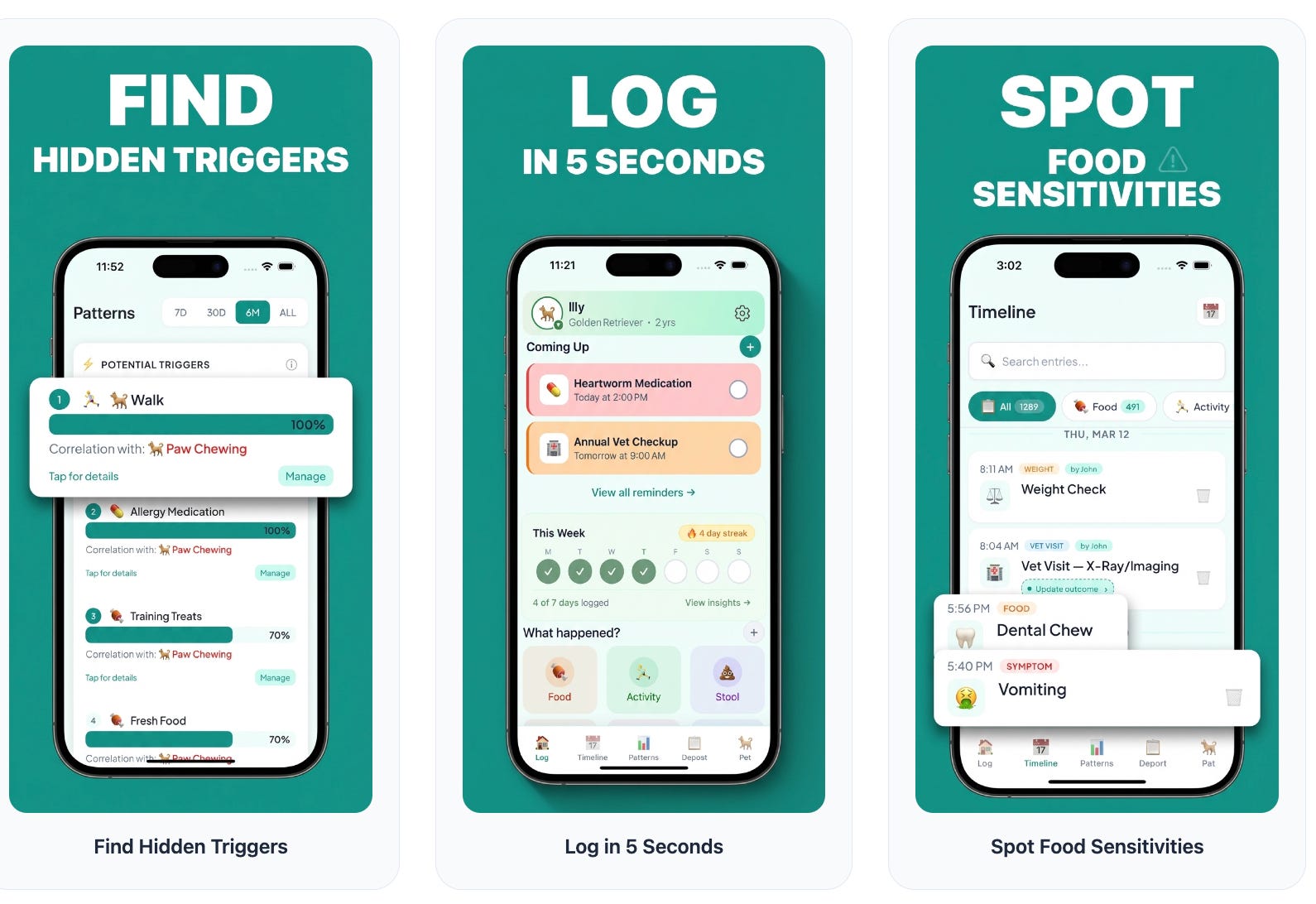
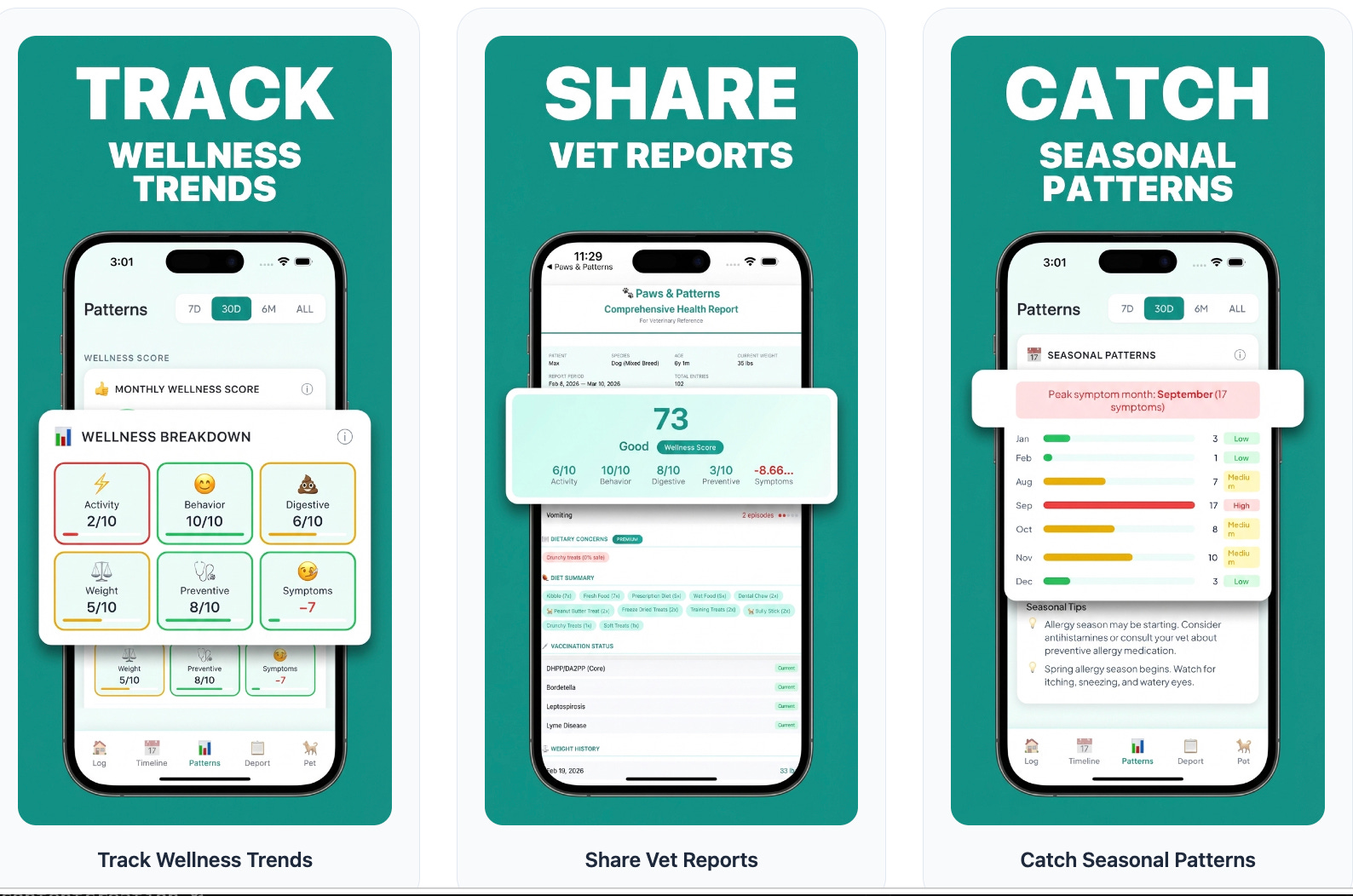
Log your pet’s food, symptoms, behaviors, and activities in under 5 seconds. The app finds patterns and potential triggers automatically. Track reminders, share timeline of activities and symptoms with vets and dog sitters, get a wellness score for your pets.
I am not a mobile developer.
I have never written Swift in production.
Yet here we are.
How it started
Back in December, I was experimenting with Claude Code, Anthropic’s AI coding agent.
I started by running /plan, a command that forces the AI to think before it builds.
That one habit changed everything.
Instead of generating code immediately, Claude mapped out the architecture first. Features. Data models. Edge cases. All before a single file was created.
Finding the problem worth solving
I did not start with an idea.
I started with a question.
I asked an AI agent to research Reddit. Specifically posts where people were frustrated, overwhelmed, or underserved.
One theme kept appearing: anxious pet parents.
People tracking their dog’s seizures in spreadsheets. Cat owners with pages of handwritten notes before every vet visit. No good tool to spot patterns over time.
I validated it by talking to real pet parents.
The pain was real.
How I built it
Knowing what to build took the most time. This was a side project, built evenings and weekends, so it took longer than it might have.
But once the direction was clear, implementation was fast. Coding agents are not the bottleneck anymore. Clarity is.
The entire app was built using Claude Code, Github Copilot and Codex with the Opus, Sonnet and GPT 5.x model.
My workflow looked like this:
/planto describe the feature and let the AI think firstReview the plan, push back on anything that felt wrong
Let the agent build, test, and iterate
Use Codex to review the code for quality and correctness
Repeat
I acted more like a product manager than a developer.
I described what I wanted. Claude figured out how to build it.
The tool that made App Store previews easy
One thing I leaned on heavily: skill.md files.
A skill file is a procedural guide written in plain language.
You describe a task step by step. An AI agent executes it end-to-end.
I used a skill file for generating App Store screenshots.
The agent analyzed the app, identified the core benefits, picked the best simulator screenshots, and produced the final preview images. All from one command.
Skill files are becoming one of the most powerful patterns in AI-assisted building.
If you are building with agents, learn this pattern early.
The tech stack
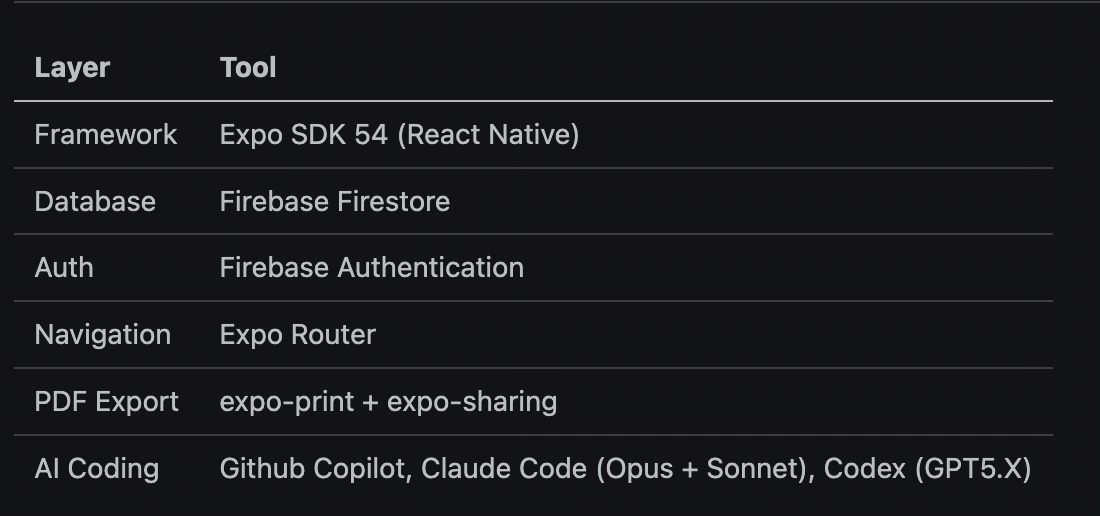
Revenuecat for subscriptions.
No custom backend. No server to manage.
Firebase handled auth and data. Expo handled the native app layer. Claude Code handled the code.
What the app actually does

Paws & Patterns helps pet owners track everything in one place. Reduces manual journal entries.
Log food, activity, symptoms, medications, vaccines, vet visits, and more
Detect correlations between symptoms and potential triggers using vet-informed timing windows
Clean timeline to track activities
Share timeline with dog sitters when on vacation
Set reminders for doctor appointments, medications, vaccines, etc.
Generate PDF reports for your vet
Track logging streaks to build a daily habit
Support multiple pets in the household
If your dog keeps scratching and you have no idea why, this app helps you find the pattern.
The part AI could not do for me
Not everything was automated.
The final step, submitting to Apple’s App Store, is fully manual.
You write the app description. You add screenshots. You fill in privacy details. You answer Apple’s review questions.
I submitted on April 22.
Apple rejected it.
“Changes needed,” the email said.
I went back into App Store Connect, read the feedback, made the changes, and resubmitted on May 8.
On May 18, the email came: “Congratulations. Paws and Patterns has been approved for distribution.”
That felt real.
AI built the app. But Apple’s review team still had to sign off.
That final human gate reminded me: shipping software is not just about building. It is about meeting standards. Privacy, safety, quality.
I think the above part can also be automated in the future with strong browser automations or if Apple provides API access.
It took three weeks from first submission to approval.
Worth every day.
What I learned
You do not need to write code anymore to ship software.
You need to know what problem you are solving.
You need to think clearly about the user.
You need to be willing to iterate. And to handle the parts that are still manual.
The barrier to building is lower than it has ever been.
If you have an idea that solves a real problem, there is no excuse left.
Try it
Paws & Patterns is free for the first 7 days.
No commitment. Just try it with your pet for one week.
Website: pawsandpatterns.app
Why I am doing this
I write a lot about AI Agents.
But I wanted to go beyond writing about it.
I wanted to use it, to build something useful for the society.
Paws & Patterns is the first of many consumer apps I plan to build with Coding Agents.
My goal is simple: find real problems that real people have. Niche problems. Underserved problems. The kind that never get a well-funded startup because the market looks too small.
Then build something useful for those people.
Fast. With AI. Without a team.
This is what the new era of building looks like.
What’s next
I am looking to integrate Paws & Patterns with other pet health trackers in the future.
If you have pets and have suggestions, apps you already use or features you wish existed, I would love to hear from you.
And if you have a problem you think deserves an app, something niche, something overlooked, send it my way.
I read every email: admin@agentchainai.com or anurag.karuparti@gmail.com
♻️ If this was useful, share it with a pet owner or a builder.
✉️ Subscribe at newsletter.karuparti.com so you never miss an edition.
P.S. Want more? 👋
1/ My visual guide to agentic AI → Gumroad
2/ Deep dives on agentic AI architecture → LinkedIn
3/ Real-time takes on breaking AI news → X
4/ Casual hot takes and community → Threads
5/ Visual frameworks and carousels → Instagram
6/ The full newsletter, free → newsletter.karuparti.com