


One question keeps coming up in every conversation I have with enterprise architects and engineering leaders:
“Should we use GitHub Copilot or Microsoft Foundry to build agentic systems?”
That is the wrong question.
These two are not competitors. They are not interchangeable. They sit at completely different layers of the enterprise stack. And the confusion between them is costing organizations months of wasted effort.
The Story
A VP of Engineering at a large financial services company calls me. His team has been using GitHub Copilot for six months. Developers love it. Code velocity is up. Pull request turnaround has dropped. Everyone is happy.
Then the CEO walks in and says: “I want an AI agent that can process loan applications end to end. Customers should be able to talk to it. It should pull their credit history, run risk models, and give a preliminary decision in under 60 seconds.”
The VP’s first instinct? “We will build it with Github Copilot.”
Three months later, his team is stuck. GH Copilot is incredible at generating code. But it was never designed to orchestrate multi-step workflows, call external APIs with governance controls, ground responses in enterprise data, or run with compliance guardrails in production.
They were using a build tool to solve a run problem.
Let me explain what I am trying to say!
The one question that clarifies everything
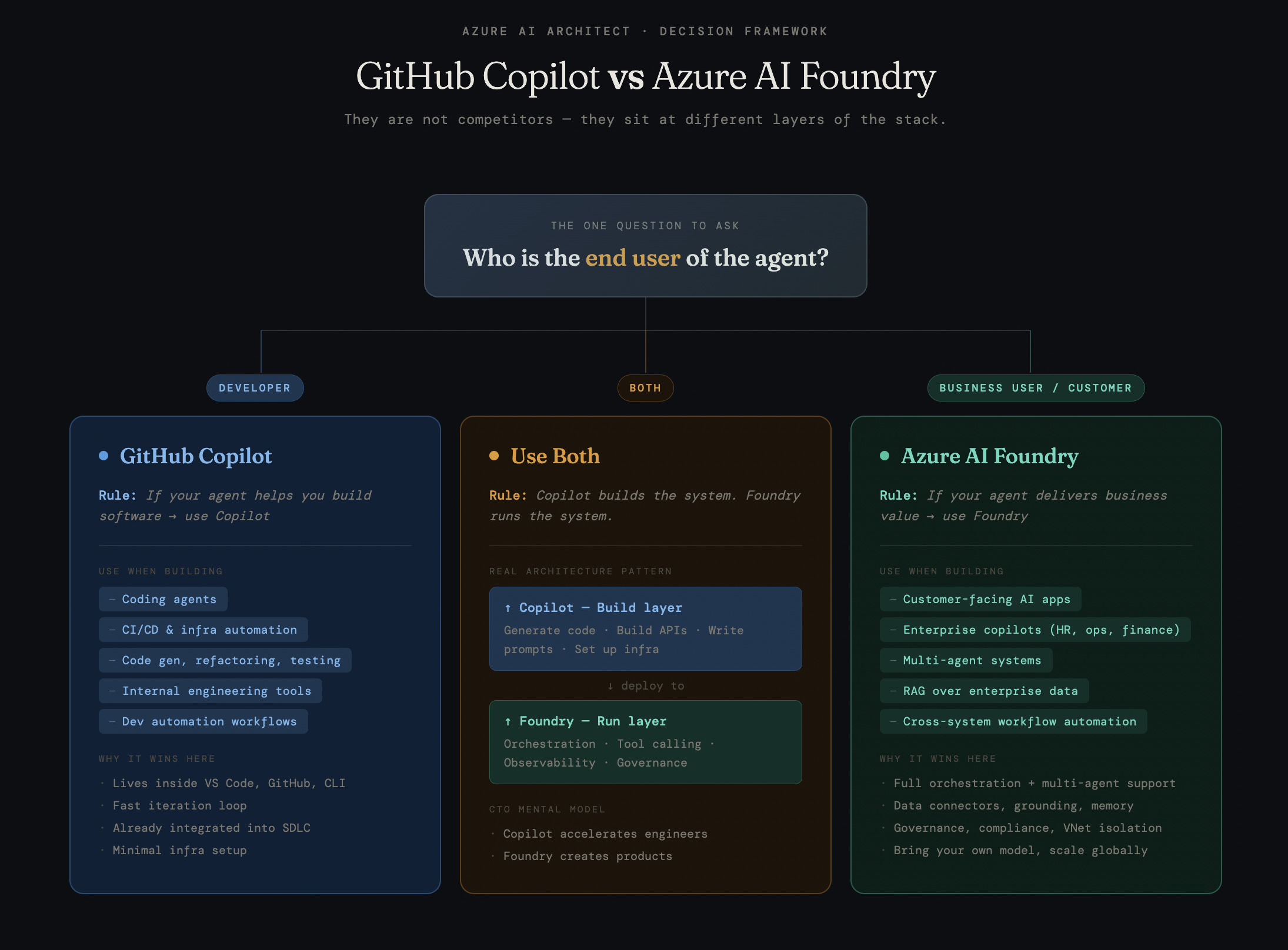
Before you pick a tool, ask one question:
Who is the end user of the agent?
If the answer is a developer, use GitHub Copilot. If the answer is a business user or customer, use Microsoft Foundry.
That is it. That is the decision framework.
GitHub Copilot: The Build Layer
Copilot is for developers building software. Most of the time, it lives inside VS Code, GitHub, and the CLI.
Use it when building:
Coding agents
CI/CD and infra automation
Code generation, refactoring, testing
Internal engineering tools
Dev automation workflows
Why it wins here:
Lives inside VS Code, GitHub, CLI
Fast iteration loop
Already integrated into SDLC
Minimal infra setup
Access to frontier coding models
If your agent helps you build software faster, GH Copilot is the answer. It accelerates engineers. That is its job.
Azure AI Foundry: The Run Layer
Foundry is for building AI products that serve business users and customers. It is the production runtime.
Use it when building:
Customer-facing AI apps
Enterprise copilots (HR, ops, finance)
RAG over enterprise data
Cross-system workflow automation
Why it wins here:
Full orchestration and multi-agent support
Data connectors, grounding, memory
Governance, compliance, VNet isolation
Bring your own model, scale globally
Proactively secure your downstream customer facing agents with red-teaming
If your agent delivers business value to end users, Foundry is the answer. It creates products. That is its job.
The Real Architecture Pattern
The most mature enterprises I work with use both. Here is how:
GitHub Copilot is the build layer.
This is where engineers move fast. Github Copilot helps generate code, scaffold APIs, write agents, prompts, instructions, and skills, and set up the supporting infrastructure.
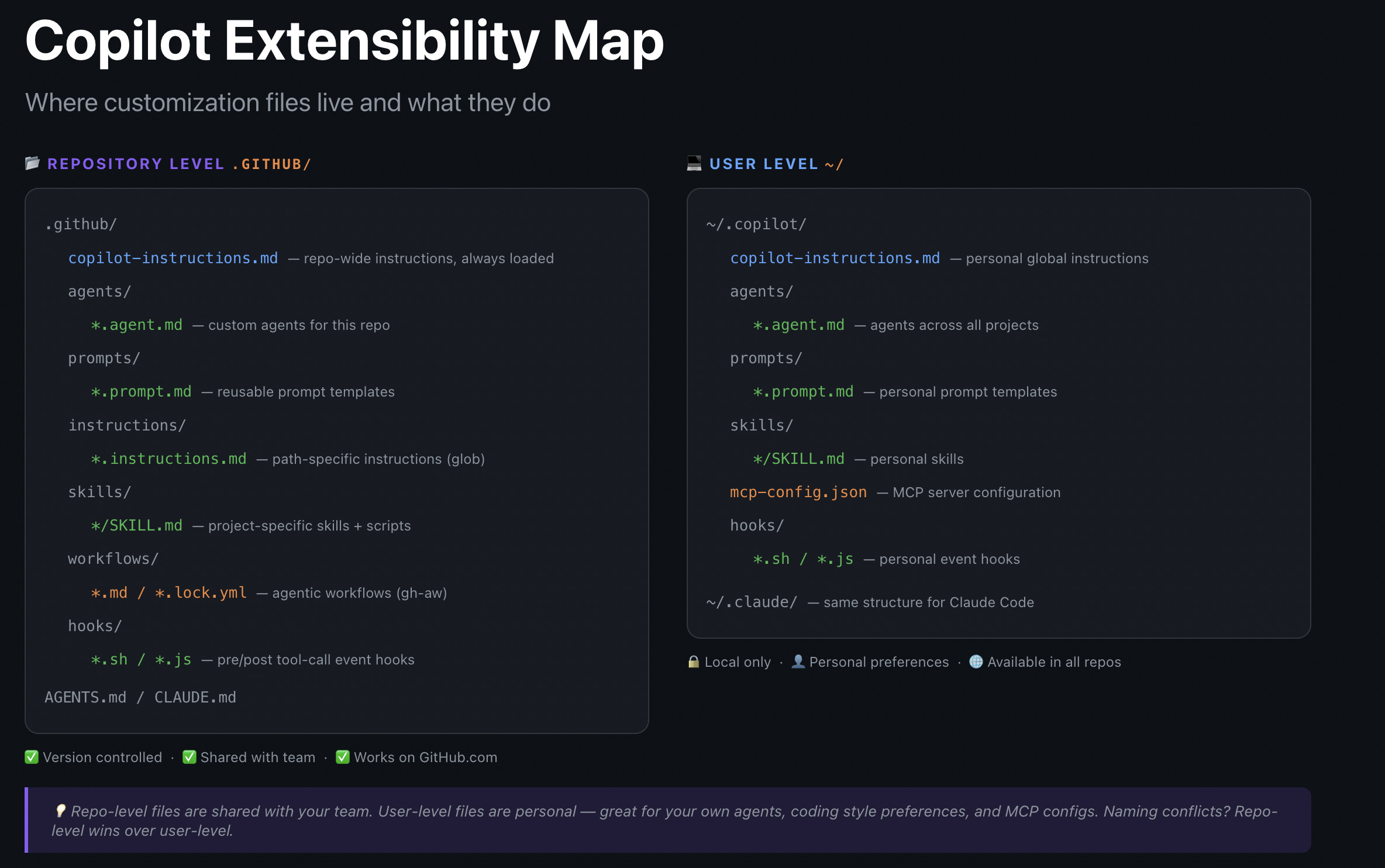
In my case, I created software engineering agents inside Copilot with specialized skill sets to help me build faster. They supported the actual development workflow across the repo, from writing agent prompts and templates to shaping schemas and preparing the app for deployment.
Azure AI Foundry is the run layer.
This is where the multi-agent system operates in production. Foundry handles orchestration, threaded runs, tool calling, grounding on enterprise data, observability, and governance.
Foundry (Run Layer) → Orchestration → Tool calling → Observability and Tracing → Governance
The CTO mental model is simple:
Copilot accelerates engineers.
Foundry creates products.
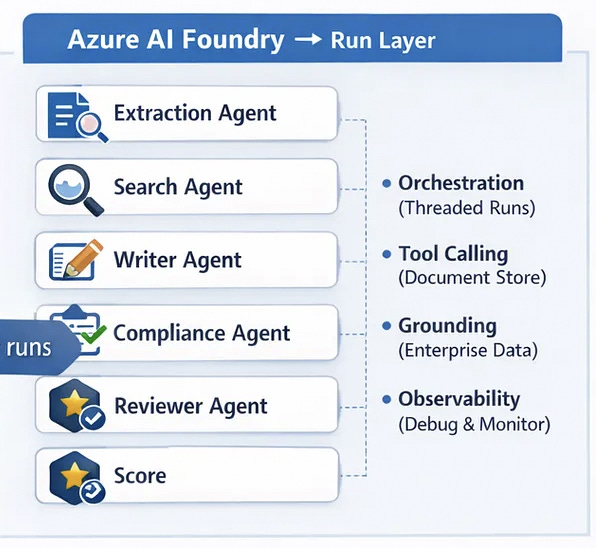
For my real estate RFP solution, Foundry ran the core RFP agents pipeline:
1) Extraction Agent
2) Search Agent
3) Writer Agent
4) Compliance Agent
5) Reviewer Agent
In one sentence, I used my software engineering agents from github copilot (build layer) to build the RFP agents, then deployed, ran, and governed them in Foundry (run layer).
Where Enterprises Get This Wrong
Mistake 1: Using Foundry for developer productivity. Foundry is a production platform. It is not designed to sit in your IDE and help you write better code. That is Copilot’s job.
Mistake 2: Thinking you need to pick one. You do not. They complement each other. The best teams use Copilot to build fast and Foundry to run at scale.
Let’s walk through the exact workflow I used to build the RFP solution.
How I personally used GitHub Copilot + Azure AI Foundry to build a multi-agent RFP solution
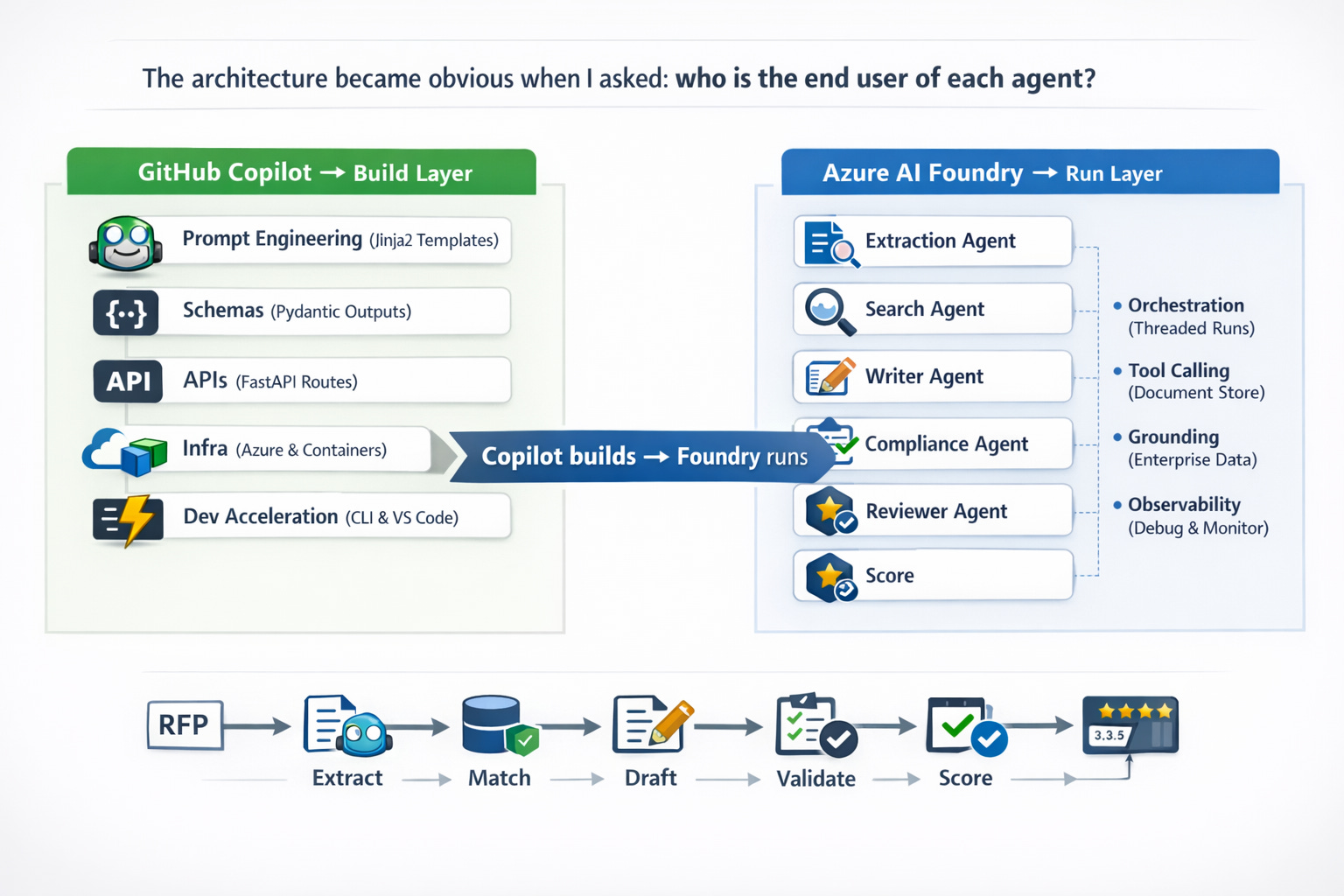
The decision framework above isn’t theoretical for me. I lived it building the RFP Accelerator, a multi-agent system that parses RFPs, extracts requirements, matches past projects and personnel, drafts proposals, and reviews them for compliance and quality.
The one question that made the architecture obvious: who is the end user of each agent?
GitHub Copilot owned the build layer. I use fleet mode on the CLI to run multiple coding agents in parallel, and use it inside VS Code with Opus 4.6.
Invoked the software engineering agent team extension from the plugin marketplace.
Together they helped me write the six agent prompts as Jinja2 templates, define Pydantic output schemas, generate the FastAPI routes, configure the Azure credential chain, and containerize the app for Azure Container Apps.
Every time I needed to move fast on code, Copilot was the accelerant. I added a copilot-instructions.md to the repo so the coding agents understood the project structure the 6-agent sequential pipeline, the agent interaction pattern and never had to be re-briefed.
I used the Software Engineering “Agentic” Team to build the RFP-specific agents that persist in Microsoft Foundry:
an Extraction Agent that parses 20 structured fields from PDFs,
a Search Agent that finds relevant past projects and matches personnel from resumes,
a Writer Agent that drafts 8+ proposal sections,
a Compliance Agent that validates against RFP requirements, and a Reviewer Agent that scores quality 1–10 with recommendations. Foundry owned the run layer.
Once the system was built, Foundry handled orchestration across agents via threaded runs, tool calling against our document store, grounding against enterprise data, and the observability I needed to debug why the Writer Agent was hallucinating on edge-case RFP formats.
The CTO mental model from the framework nails it: Copilot accelerated my engineers (me, in this case), Foundry became the product. They never competed for the same job. One got the system built in days instead of weeks, the other made it production-ready with governance and memory.
If you’re accelerating how engineers build, start with Github Copilot.
If you’re orchestrating agents your end users interact with, Foundry is where it needs to land.

The Bottom Line
GitHub Copilot and Microsoft Foundry are not alternatives.
You build with github copilot and then run it on Foundry
The organizations that figure this out early will ship faster, govern better, and scale without the fragmentation that kills most enterprise AI initiatives.
The ones that do not will spend months building with the wrong tool at the wrong layer, wondering why nothing makes it to production.
Big thanks to Cody Carlson, Global Black Belt, for guiding me on building software with GitHub Copilot CLI and agentic coding. I’m fortunate to be surrounded by stellar colleagues at Microsoft who help me grow every single day.
Which layer of the stack is your team building at right now? Reply and let me know.
Note: The stories mentioned above are just hypothetical, based on my experiences on the field and for me to convey messages properly.
I built a 74 visual AI library with animated guides that take you from agent basics to production grade architectures.
Agents. Agentic RAG.Multi agent orchestration.Enterprise governance. Production patterns.
Used by architects, engineers, and executives. 3 million plus impressions on Linkedin.
Built for fast clarity before meetings, interviews, and real world builds.